How QR Codes Work: Encoding, Structure, and Error Correction
Learn how QR codes encode data: finder patterns, timing modules, data encoding modes, Reed-Solomon error correction, and why QR codes can be damaged and still scan.
- qr code
- how qr codes work
- error correction
- encoding
- barcode
QR codes (Quick Response codes) were invented by Denso Wave in 1994 for tracking automotive parts. Today they’re everywhere. Understanding how they work explains why they’re so reliable and what happens when part of the code is missing.
What a QR code is
A QR code is a 2D matrix barcode — a grid of black (dark) and white (light) modules (squares) arranged in a specific pattern. Each module encodes one bit of data. The modules together encode text, URLs, or binary data using a specific encoding scheme.
The structure of a QR code
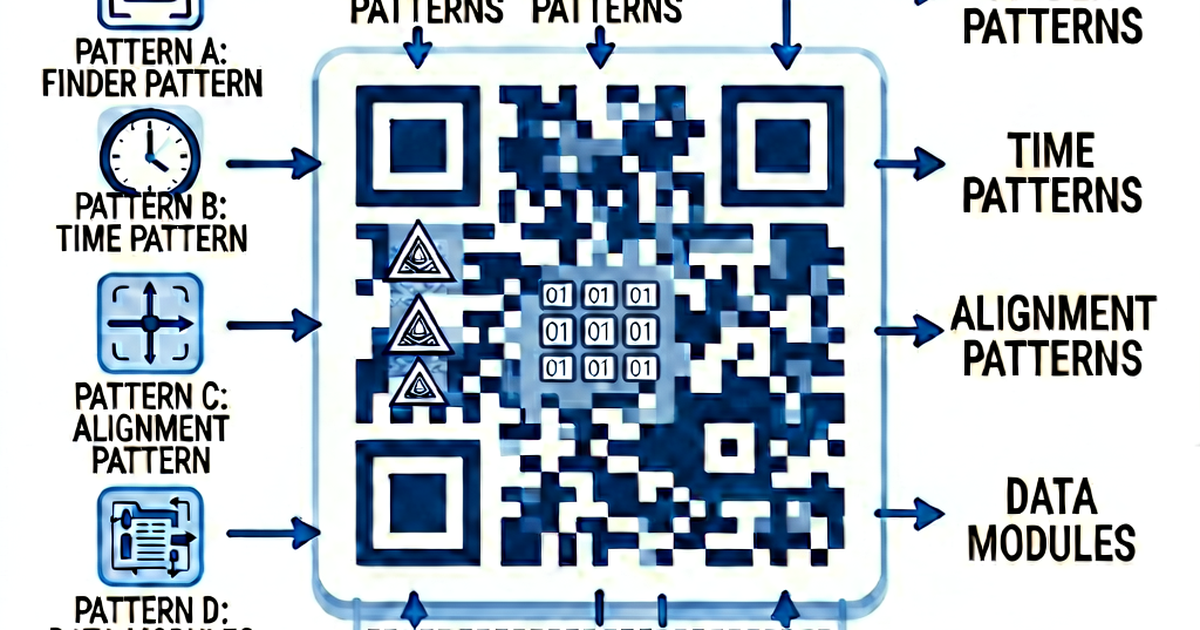
┌──────────────────────────────┐
│ Finder  ┃ Timing ┃ Finder   │
│ Pattern ┃ Rows   ┃ Pattern  │
│─────────┃────────┃──────────│
│ Format  ┃  Data  ┃          │
│ Info    ┃  +     ┃  Data    │
│─────────┃  ECC   ┃          │
│ Finder  ┃        ┃ Alignment│
│ Pattern ┃        ┃ Pattern  │
└──────────────────────────────┘
Finder patterns
The three squares in the top-left, top-right, and bottom-left corners. They’re always 7×7 modules with a specific pattern that lets scanners find and orient the code regardless of angle or rotation.
Timing patterns
Alternating black-and-white rows and columns connecting the finder patterns. They help the scanner locate individual modules.
Alignment patterns
Additional square patterns in larger QR codes (version 2+). They compensate for image distortion — if the code is on a curved surface or photographed at an angle.
Quiet zone
The white border around the code. It must be at least 4 modules wide. Without it, scanners can’t reliably find the code’s edges.
Format information
Encoded near the finder patterns — stores the error correction level and mask pattern number. This lets the scanner know how to interpret the data region.
Data and error correction codewords
The majority of the code area. Contains the actual encoded data, interleaved with error correction data (see below).
Data encoding modes
QR codes support four encoding modes, each optimized for different character sets:
| Mode | Characters | Bits per char |
|---|---|---|
| Numeric | 0-9 | 3.33 bits |
| Alphanumeric | 0-9, A-Z, space, $%*+-./: | 5.5 bits |
| Byte (Latin-1 or UTF-8) | All 256 Latin-1 chars (or UTF-8) | 8 bits |
| Kanji | Japanese characters | 13 bits |
A URL like https://example.com uses Byte mode. If your URL only uses uppercase letters and digits, it could use Alphanumeric mode and pack more data.
QR code versions (size)
QR codes come in 40 versions (sizes). Version 1 is 21×21 modules; each higher version adds 4 modules per side (version 2 = 25×25, …, version 40 = 177×177).
More data requires a higher version (larger code). With error correction level M:
- Version 1: up to 20 alphanumeric characters, or ~17 bytes
- Version 10: up to 395 alphanumeric characters, or ~271 bytes
- Version 40: up to 4,296 alphanumeric characters, or ~2,953 bytes
This is why long URLs can produce large, dense codes that are harder to scan — more data requires more modules.
Error correction (why damaged QR codes still work)
QR codes use Reed-Solomon error correction, which allows the scanner to recover data even when part of the code is damaged or obscured. There are four levels:
| Level | Data recovery | Notes |
|---|---|---|
| L (Low) | 7% | Smallest code, least robust |
| M (Medium) | 15% | Default for most generators |
| Q (Quartile) | 25% | Good for damaged environments |
| H (High) | 30% | Allows logos in the center |
“30% recovery” means up to 30% of the code’s codewords can be lost or wrong and the scanner can still reconstruct the original data. This is why you can put a logo in the center of a QR code — the logo obscures some modules, but they’re recovered by error correction.
The trade-off: higher error correction → more modules → more data needed → larger code.
The scanning process
- Find finder patterns — locate the three corner squares
- Determine orientation — determine which way is up
- Read format information — learn the error correction level and mask pattern
- Sample module values — sample each module to get a bit
- Unmask — XOR the data region with the mask pattern (to ensure no large areas of uniform color that could confuse sampling)
- Apply error correction — use Reed-Solomon to fix any errors
- Decode — interpret the bits using the detected encoding mode
- Return text — output the decoded string
Mask patterns
To prevent large uniform regions (which cause sampling problems), QR codes apply a mask — an XOR operation with one of 8 predefined patterns. The generator picks the mask that produces the most balanced result. The chosen mask number is stored in the format information.
Why some QR codes don’t scan
- Quiet zone too small — nothing to delimit the code’s edges
- Low contrast — dark gray on medium gray is hard to distinguish
- Too much data — tiny modules at the printed size
- Physical damage — exceeds the error correction capacity
- Reflective surface — metallic or glossy backgrounds cause camera glare
- Wrong colors — light-on-dark can confuse some scanners
Generate QR codes at qrcodegen.io.
Related reading
-
QR Code Best Practices: Design, Size, Placement, and Testing
QR code design and usage best practices: minimum size, contrast, quiet zone, error correction, print vs digital, and how to test QR codes before publishing.
-
QR Code for Website: Link Any Page to a Scannable Code
Create a QR code for any website URL. Covers URL optimization, UTM tracking, landing page tips, size requirements, and how to embed QR codes in print and digital content.
-
How to Create a QR Code: A Complete Beginner's Guide
Learn how to create a QR code for a website, WiFi, contact, or text. Covers online generators, static vs dynamic QR codes, and size requirements for print.